Every org. Every direction. One platform.
Metadata deployment. Data backup. Org seeding.
Agentic assistance available every step of the way. Without the stack.
What OpsForce does
Four capabilities. One platform. No stacking tools.
Ship changes with surgical precision
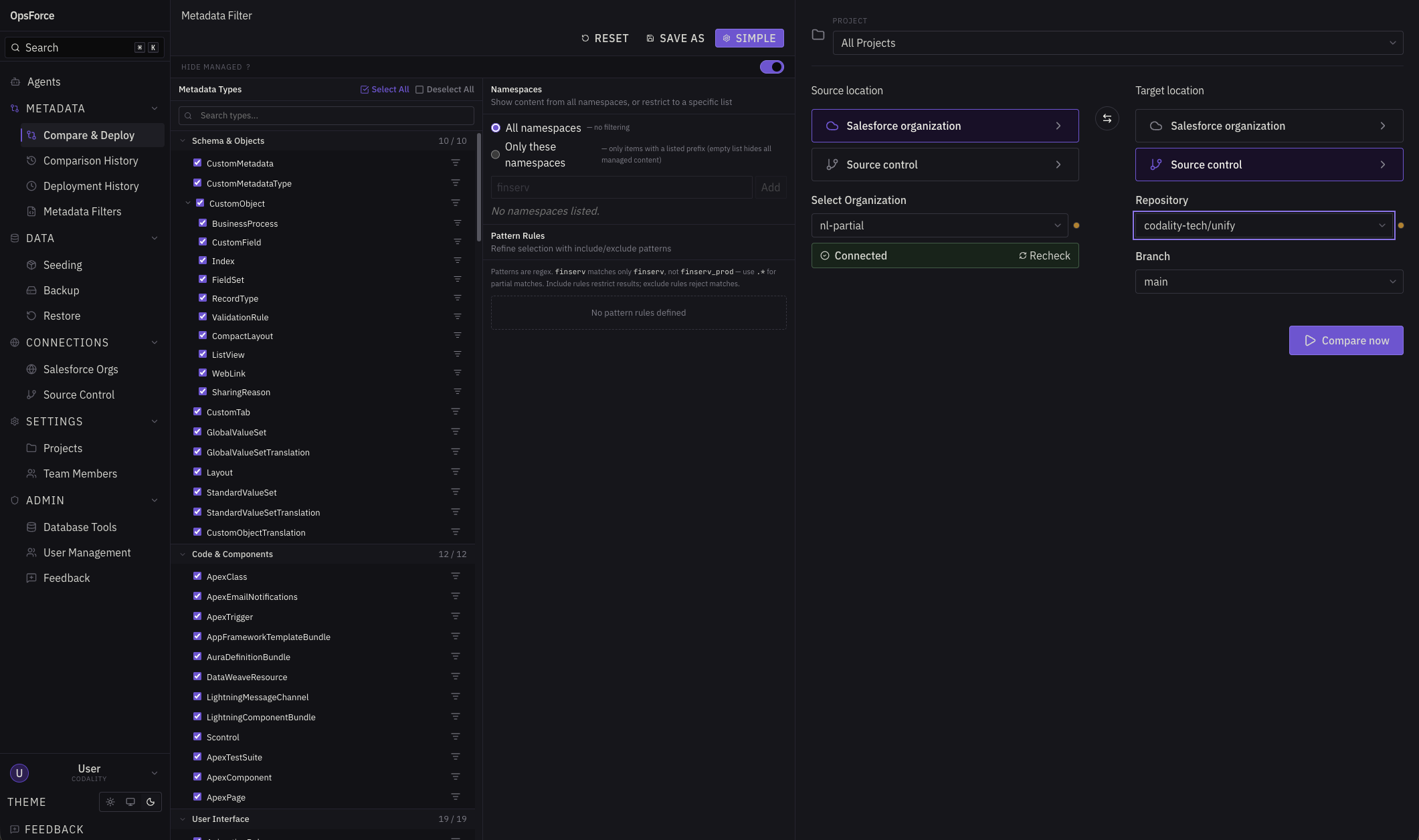
Any org. Any direction.
Org-to-org, org-to-git, git-to-org, git-to-git. All four comparison directions across 210 metadata types.
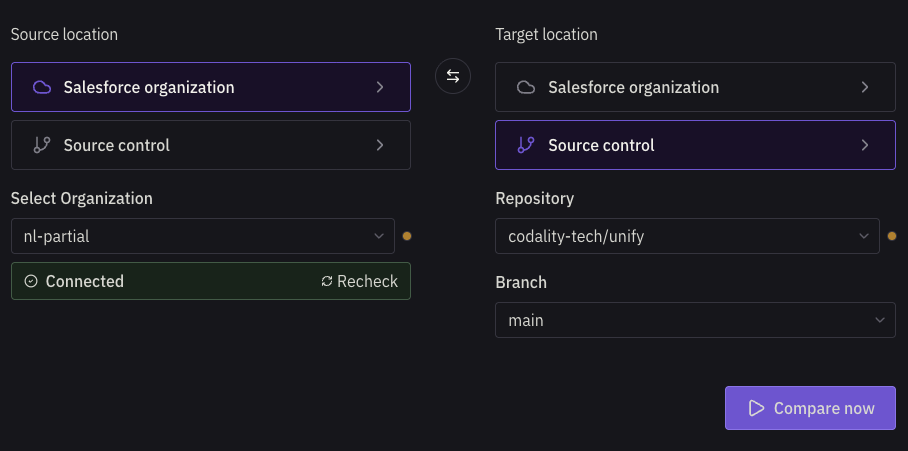
Field and line-level specificity
Profiles and Permission Sets decompose into 12 fragment types. Apex, LWC, and Aura diff at the hunk level. Deploy exactly what changed — nothing more.
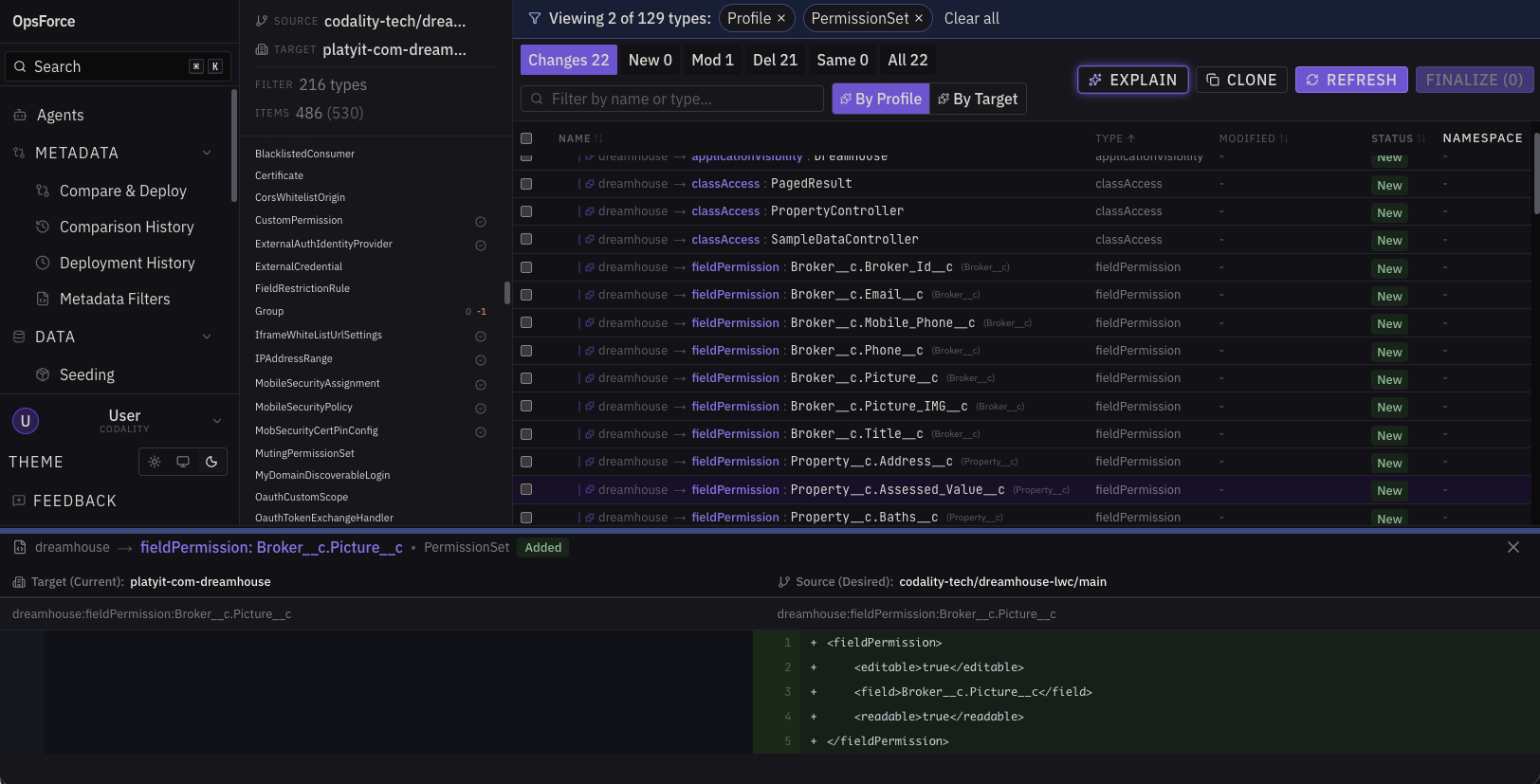
Granular Filtering
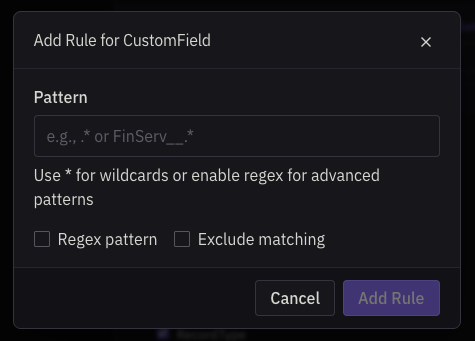
Create Metadata Filters, filter by or exclude namespaces, even create RegEx filters for metadata pattern matching.
Deploy Agents
Schema Advisor flags schema risks before a deploy. Deploy Failure Triage reads a failed deployment and proposes a fix plus a durable filter rule so the same failure doesn't recur. It executes: only when you approve. Write tools opt-in, every change gated, every run on the record.
Never lose a record
Point-in-time restore
Roll any object back to any previous state. Dry-run mode shows you exactly what would happen before anything touches the org.
Automated snapshots
Scheduled backups via Bulk API 2.0. Manifest-based archives with full traceability.
Selective restore
Three-step wizard. Choose your target org, pick your objects, confirm. Recover specific records without disturbing the rest.
Move data to any org. Including production.
Dependency-resolved templates
Define what you want to move. OpsForce resolves object relationships and insertion order automatically.
Automation control
Suspend workflow rules, triggers, and process builders before seeding. Re-enable after. No accidental fires on imported records.
No environment restrictions
Source or target any org — sandbox, partial, developer, or production. Where every other tool stops, OpsForce keeps going.
Ask your org anything
Natural language metadata queries
Ask what profiles have access to a field, what's referencing a class, or what changed between two orgs — in plain English.
ERD and relationship graph
Visualize your org's data model. Field-level detail, object relationships, and dependency chains — cached and queryable before any deployment or seed run.
Org-aware context
Query results are grounded in your actual org metadata, not generic documentation. The answer reflects your configuration, not Salesforce's defaults.
You lead. Agents assist.
OpsForce runs its own agents to explain, plan, and act on your word. And it speaks MCP, so the agent already in your editor can reach your orgs too.
In App Agentic Assistance.
Research, then propose.
OpsForce agents read your live orgs through read-only tools and do the slow, error-prone diagnostic work for you. When something should change, the agent drafts the exact operation and stops for your approval. You lead. Agents assist.
Fix a failed deploy.
When a deployment fails, the Deploy Failure Triage agent reads the error, inspects every rejected component, and assembles a corrected retry: dependencies to add, items to drop, a plain-language reason for each. It never invents components. Approve the plan and OpsForce builds a draft deployment with the fix already applied, ready when you are.
Stop it happening again.
A retry fixes today’s deploy. This fixes tomorrow’s. The same triage can propose a durable rule for your saved metadata filter, excluding the component class that keeps failing. Approve it and the rule takes effect on your next comparison. Your filters get smarter with every incident.
Draft a seeding template.
Point a seeding agent at a source org and it proposes a ready-to-edit template: which objects, which fields, with optional filters and limits. It lands in your Seeding workspace as a draft. No data moves until you run the seed yourself.
Nothing happens without you.
Every agent action is a proposal, not an act. Approving one creates or updates a draft, never a push to an org or a record on the move. Stale proposals expire, and every proposal and decision is recorded in a replayable run timeline, so there’s always an auditable trail.
Fluent in MCP.
Bring your own agent.
OpsForce speaks the Model Context Protocol, exposing your connected org data as tools inside AI assistants. Instead of copy-pasting org details between apps, your agent queries your orgs, triggers comparisons, and inspects metadata diffs without leaving the chat. Currently read-only: six tools that query and observe, nothing deployed.
list_orgsConnected orgs, with type and connection status.
list_projectsProjects grouping orgs, repos, and saved filters.
compareStart an org-to-org metadata comparison.
comparison_statusPoll a running comparison until it completes.
get_diffRead the completed diff, grouped by metadata type.
list_fragmentsDrill into which permission or rule changed.
How OpsForce is Different
Comparisons that don't wait on Salesforce
Cached metadata, instant results
OpsForce indexes your org metadata after the first fetch. Subsequent comparisons only re-query components that have changed — everything else is served from the cache. No competitor documents a caching architecture. The larger the org, the bigger the gap.
No Salesforce footprint
OpsForce runs entirely outside your orgs via standard Salesforce APIs. No managed package to install, no credentials stored, nothing to maintain inside your environment.
Agents grounded in the cache
When an agent reads your org — to triage a failed deploy, answer a metadata question, or draft a seeding template — it reads the live cache, not Salesforce. Faster responses, far fewer API calls, and answers that reflect your actual org state.
The diff that goes all the way down
Deploy at surgical precision
Deployment scope is defined at the same granularity as the diff. Include one field permission, exclude another, within the same metadata file. No all-or-nothing file deploys.
Agents propose at the same level
Deploy Failure Triage doesn't recommend files — it adds and drops individual components with specific arguments, validated against your source comparison. Your diff and your agent speak the same language.
Fragment and hunk views
Profiles and Permission Sets decompose into 12 fragment types — field permissions, object permissions, page layout assignments, and more. Apex, LWC, and Aura diff at the hunk level. Not just which file changed, but which line, which permission, which rule.
Seed the configuration that can't be deployed
Data-driven config, finally movable
Many AppExchange apps and internally developed apps store configuration in custom objects — data records that drive business logic but can't be deployed with the metadata tools that deploy the code that reads them. OpsForce seeds them directly between any two orgs.
Any org. Any direction.
No artificial restrictions on source or target. Seed from production to sandbox for realistic test data. Promote config from sandbox to production. Unlike tools designed for sandbox-only recovery, OpsForce was built without environment-type constraints from the start.
Automations suspended automatically
Workflow rules, triggers, and process builders are suspended for the seed run and re-enabled after. No accidental fires on imported records. Template is reusable across every environment you manage.
Simple, transparent pricing
Scales with your team. Start free — upgrade when you're ready.
| Free | Starter Popular | Pro | Enterprise | |
|---|---|---|---|---|
| $0 | $40/seat/mo | $90/seat/mo | Custom | |
| Team members | 1 | 3 | 10 | Unlimited |
| Connected orgs | 2 | 5 | 20 | Unlimited |
| Repositories | 1 | 3 | 10 | Unlimited |
| Comparisons / month | 20 | 100 | Unlimited | Unlimited |
| AI credits / month | 200 | 1,000 | 5,000 | Unlimited |
| Seeding runs / month | 2 | 10 | 25 | Unlimited |
| Backup & restore | — | Add-on | Add-on | Included |
| Metadata cache refresh | On-demand | Hourly | 10-minute | 10-minute |
Available on any paid plan. Unlocks backup & restore and unlimited seeding runs. Includes 50 GB fair-use storage.
2,000 credits for $20 · 10,000 credits for $90
1 AI credit = 1¢. Credits consumed = API cost × 1.5. Prices in USD. Enterprise pricing is custom — contact us.
Frequently asked questions
Got questions? We've got answers. Everything you need to know about OpsForce.
Yes. OpsForce breaks Profile and Permission Set deployments down into individual permission types: field permissions, object permissions, layout assignments, record type visibilities, tab visibilities, and more. This is called the fragment system. Instead of treating a Profile as a single deployable unit, OpsForce lets you select exactly the permissions you want to promote and leave everything else untouched.
This matters because Profiles accumulate permissions from every object, field, and app in your org. A full-Profile deployment risks overwriting unrelated changes made directly in the target org — especially in production, where permissions may have been manually adjusted since your last sync. OpsForce's fragment system breaks a Profile into 12 distinct permission types, so you can target exactly what changed and leave everything else untouched.
Yes. When OpsForce compares Apex classes, Lightning Web Components, and Aura components, it diffs at the line level and groups changes into hunks — discrete blocks of added, removed, or modified lines. You can review each hunk individually and choose which ones to include in a deployment.
This is useful when a class file has multiple unrelated changes in flight at the same time — a bug fix in one method, a feature addition in another. Rather than holding the bug fix until the feature is ready, or deploying both and hoping nothing breaks, you select just the hunk containing the fix and promote it independently. The rest of the file stays as-is in the target org.
When two developers have made changes to the same Apex class, OpsForce uses three-way merge to resolve the conflict intelligently. It compares both versions against the original common ancestor — the version both developers started from — to understand what each person actually changed.
If the changes are in different parts of the file, OpsForce can often resolve the merge automatically without any manual intervention. If the changes overlap on the same lines, OpsForce flags only the genuine conflict and presents both versions side by side so you can decide what the final code should look like. You're never forced to reconcile an entire file when only a few lines are actually in dispute.
OpsForce maintains a metadata cache per org. After the initial fetch, unchanged metadata is served from the cache rather than retrieving it again with fresh API calls to Salesforce. This means results come back faster and your org's API limits aren't being consumed every time a comparison runs. Freshness guards ensure the cache stays current, so you're not working with stale metadata.
For large orgs with hundreds of metadata types, or teams running comparisons frequently, both benefits compound. The first run fetches everything; subsequent runs are fast and API-light, and your governor limits can stay focused on business use cases.
Every Salesforce DevOps tool consumes your org's limits when it reads or writes metadata. Comparing two orgs means retrieving metadata, and retrieval draws on your allocation, so the real question is how much a tool consumes to do its job.
OpsForce is built to consume as little as possible. It caches metadata per org and retrieves only what has changed since the last sync, with freshness guards that keep the cache current. After the first comparison, repeat runs serve unchanged metadata from cache instead of re-reading the whole org, so OpsForce makes a fraction of the API calls that re-fetch-every-time tools do. The headroom that saves stays available for your business workloads.
Most tools don't work this way. Without a persistent, change-aware cache, every comparison pays the full retrieval cost again, and that cost lands on your org's limits each time. OpsForce pays it once and then reads from cache until something actually changes. That's the difference that keeps it from eating into the headroom your business processes depend on (and how it's able to perform so much faster).
Copado is a mature enterprise platform and a capable metadata deployment tool. Where OpsForce pulls ahead is deployment granularity and speed. OpsForce diffs Apex, LWC, and Aura components at the line level — you can select individual blocks of changes and deploy them independently rather than pushing an entire file. For Profiles and Permission Sets, OpsForce breaks deployments down into 12 discrete permission types, so you can promote a single field permission without touching anything else in the Profile. Copado deploys at the metadata-type level and doesn't offer this depth of selection.
On speed, OpsForce caches metadata per org, so repeat comparisons are fast and don't consume API calls on every run. Copado makes fresh API calls for each comparison.
Where Copado leads today: full CI/CD pipelines with approval gates and compliance tooling built in. If you're already running deployments through GitHub Actions or a similar pipeline tool, you can continue using it alongside OpsForce — OpsForce handles the Salesforce-specific comparison and deployment operations that those tools can't do natively. Native pipeline automation within OpsForce is on the roadmap.
Gearset has one of the strongest metadata comparison reputations in the Salesforce ecosystem, and it's deserved. OpsForce matches it on comparison quality and goes further on granularity — line-level code diffs and fragment-level Profile deployments that let you promote exactly what changed and nothing else. Gearset's diff is file-level; OpsForce goes to the hunk and fragment level.
Backup and seeding are also available inside OpsForce via the Data Add-on ($75/mo per 50 GB), so you're not running a separate tool or integration to cover those workflows. With Gearset, backup is a separately priced add-on and production seeding isn't supported — more on that in the Seed section.
Where Gearset leads today: CI/CD pipelines and cloud Git integration with GitHub, GitLab, and Azure DevOps. If you're already running Gitflow through GitHub or GitLab, your existing pipeline can continue to orchestrate deployments while OpsForce handles the Salesforce-specific operations.
No. OpsForce is a hosted application that runs entirely outside your Salesforce org. Nothing gets installed in your environment.
It connects to your orgs via standard Salesforce APIs: the same Metadata API, Tooling API, and Bulk API 2.0 that Salesforce itself exposes. This is the same architectural approach as Gearset, and the opposite of Flosum and Prodly, which are Salesforce-native managed packages running inside your org.
The practical difference is what you have to maintain. A managed package lives in your org: you install it, you upgrade it, it consumes your org's storage, and it's part of every security and change-management review you run. OpsForce has none of that footprint. You connect an org and disconnect it when you're done, and there's never a package version to manage or a Salesforce footprint to account for.
OpsForce supports all four comparison directions: org-to-org, org-to-Git, Git-to-org, and Git-to-Git. That covers any combination of live Salesforce environments and repository states, in either direction.
Yes. OpsForce supports metadata deployment between any two orgs regardless of environment type: sandbox-to-sandbox, sandbox-to-production, or any other combination. This is not universal among Salesforce DevOps tools; some restrict deployment directions or require specific environment configurations. With OpsForce, the source and target are just org connections — environment type is not a factor.
It helps to separate two things that often get conflated: deploying code to a branch, and deploying metadata to a Salesforce org. In a standard software pipeline, those are the same event — merge to main, pipeline runs, artifact ships. In Salesforce development, they're not. The merge happens in Git. The metadata deployment is a separate operation that requires Salesforce-specific tooling: diffing metadata types, resolving object dependencies, fragmenting Profile deployments, handling API authentication across environments. GitHub Actions cannot do that work. Neither can GitLab CI.
OpsForce handles the Salesforce layer. Your pipeline handles the orchestration layer. A merge to main can trigger a GitHub Actions workflow that calls OpsForce to execute the metadata deployment — that's the right separation of concerns, and it's cleaner than collapsing both into a single tool that has to be mediocre at one of them.
Tools like Copado and Gearset built pipeline features into their products partly because there wasn't a clean handoff model between Git orchestration and Salesforce deployment. OpsForce is designed around that handoff. The pipeline already exists — OpsForce picks up where it can't go.
Webhook-based triggers so your pipeline can invoke OpsForce deployments directly are on the roadmap.
OpsForce currently supports locally mounted Git repositories. GitHub cloud integration is in active development — GitLab, Azure DevOps, and Bitbucket will follow. If your team works with local repos or self-hosted Git today, you're fully supported. Cloud Git integration is coming.
OpsForce currently supports team-based access control. Team admins manage membership, control which Salesforce orgs are connected to the team, and handle org-level operations. Members can initiate comparisons and deployments within the team's connected orgs.
Formal approval gates — where a named approver must sign off before a deployment executes — and granular per-org deploy permissions are not yet implemented. For teams that need a human checkpoint before production deployments, that step lives outside OpsForce today, whether that's a PR review in GitHub or a change management process in an existing ticketing system.
Formal audit trail and compliance tooling — deployment logs tied to named users, exportable for SOX or change management review — is not yet implemented in OpsForce. Tools like Flosum and Copado Enterprise are purpose-built for regulated-industry governance requirements, and they lead on this capability today.
If compliance documentation is a hard requirement for your team, we'd rather be direct about that than oversell where we are. OpsForce's Enterprise tier includes custom configuration options, including data residency controls and tailored deployment workflows — reach out to discuss what your compliance requirements actually look like and whether we can meet them. For teams whose primary concern is deployment quality and speed rather than audit documentation, OpsForce covers that well today.